Listing your used car on HongCars is easy. Simply create an account, enter your vehicle details, upload photos and provide your contact information before submitting your listing for review.
Create an Account
Before listing a vehicle, you will need to create a HongCars account. This makes it easier to manage, edit or remove your listings later.
You can quickly create an account from the Register / Log In page. When registering, please select a Dealer account.
Alternatively, you can sign in using your Google account for faster registration. You can then go to your Account Centre and select Become a Dealer to register as a dealer.
Enter Your Vehicle Details
After creating your account, go to: Post FREE Ad → Sell My Car
You will then be taken to the vehicle listing page, where you can enter your car's details.
Your vehicle's make and model are particularly important, so please make sure they are entered correctly. When selecting a vehicle make, you can use the search function in the drop-down menu to quickly find the relevant brand.
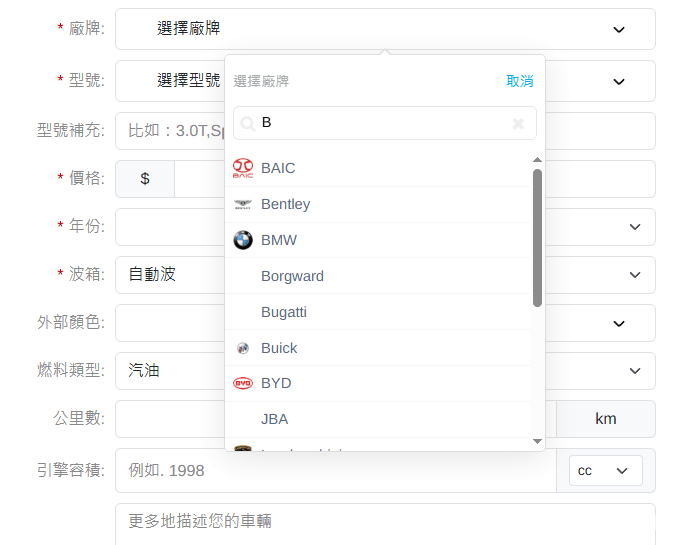
If you cannot find the correct model, scroll to the bottom of the list and select Other. Our team may add the relevant vehicle model information later.
Please provide accurate information for the asking price, mileage, colour and other vehicle details so that potential buyers can better understand the vehicle you are selling.
Upload Vehicle Photos
Each used car listing must include at least one recent photo of the vehicle.
Vehicle photos are an important reference for buyers when viewing and assessing a car. Listings without any vehicle photos may not be approved.
To improve compatibility and ensure your photos meet our listing requirements:
Use clear and recent photos of the vehicle.
Images with a width or height below 300px may not be approved.
The original image file should be smaller than 10MB.
We recommend using JPG or JPEG format for the best compatibility.
Note: If you are uploading photos from an iPhone and the images are in HEIF or HEIC format, we recommend converting them to JPG before uploading.
You can use the free soConvert tool to convert HEIF or HEIC images to JPG for better compatibility.
Seller Contact Information
Your contact details allow potential buyers to get in touch with you, so please make sure that your mobile number, WhatsApp number and email address are entered correctly.
Many buyers prefer to contact sellers directly through the WhatsApp button on the vehicle listing page to ask questions or discuss the vehicle further.
If you publish a listing without logging in to a HongCars account, the email address you provide will be important for managing your listing. Your listing management link and management password will be sent to that email address.